Zoho Mail Control Panel - Help

Zoho Mail Admin Console Configure Email Delivery One and One DNS - MX Records

Update MX records to receive emails: 1 & 1

If your DNS is hosted with 1 and 1 follow the below steps to change the MX Records of the domain to start receiving emails.
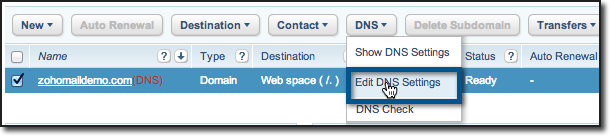
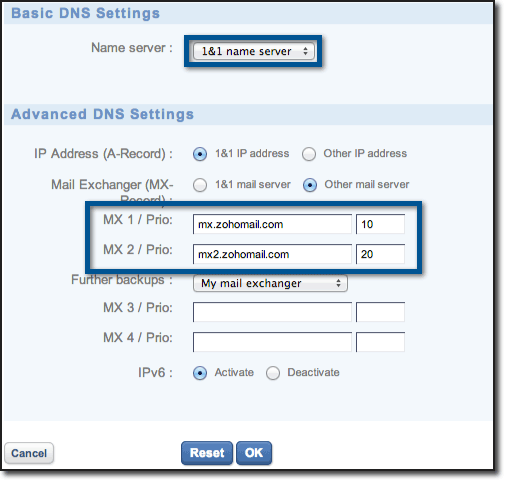
  1. Login to your 1 and 1 account.
  2. Select Domains and Webspace.
  3. Click Domains to launch Domain Overview.
  4. Select DNS >> Edit DNS Records.
     
  5. Under Advanced DNS Settings, select other Mail server. 
  6. In the text area MX1/ Prio, specify mx.zoho.com and 10.
  7. In the text area MX2/ Prio, specify mx2.zoho.com and 20.
  8. Click OK to save the changes.

You have now added the MX Records for your domain successfully. The MX records will be effective as per the TTL time of the domain. You can check the MX records of the domain using the third party tool www.mxtoolbox.com . 

 

The Most Powerful Hosted Email for Business Enterprise level hosted mail starting at just $2 /Month /User

Get Started