Send File as Attachment
Send Mail as Attachment from Zoho Docs
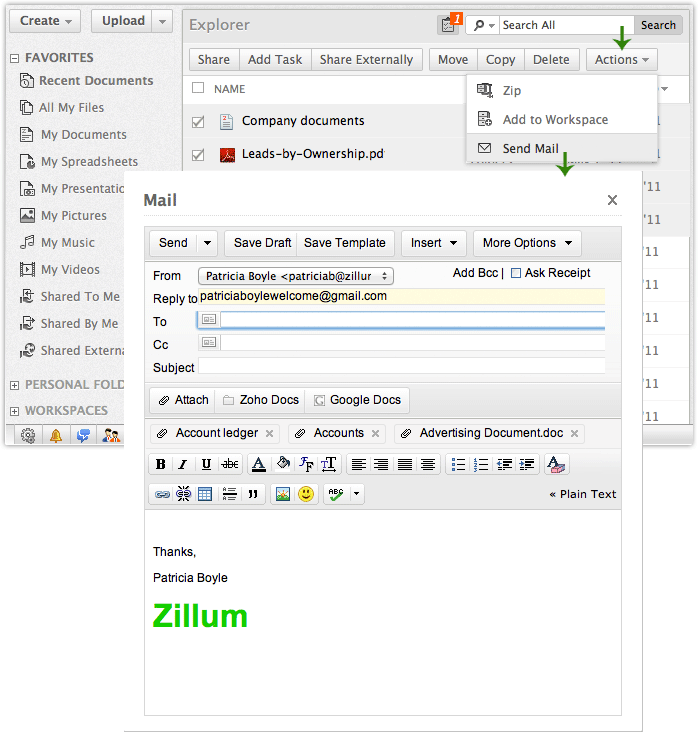
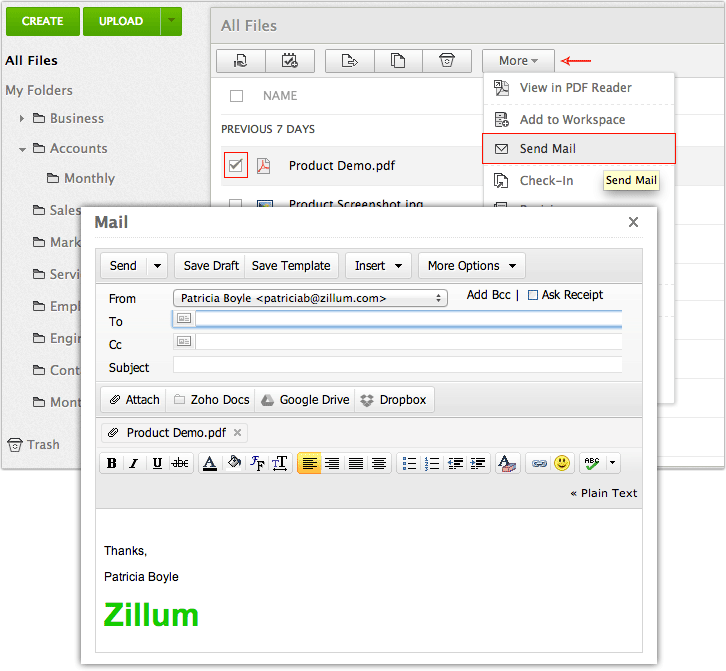
Zoho Mail enables users to send and receive mails in an easy and reliable manner. Zoho Mail is completely integrated with Zoho Docs Online Document Management System, which enables users to mail any of their existing documents from Zoho docs easily. Send mail icon beside each document will let you mail any specific document as an attachment. Alternatively, you can also select multiple documents and use the “Send mail” option. No need to search for your contacts. As it’s integrated with Zoho Mail it contains address book by default, you can select the recipient from address book to whom you like to mail your documents.
Steps - Click on Personal Folders and select your document
- Click on the Actions drop-down arrow in the tool bar
- From the drop-down menu click on Send Mail
- The Zoho Mail window appears with the document attached automatically
- Enter the recipient email address
- Click on Send button at the top to mail your documents.
Compose mail and Attach files from Zoho Mail
Zoho Mail provides an option “Attach from Zoho Docs” which is available in the compose window. Documents of various file formats available in Zoho Docs Online Document System will be listed and also provides different options to choose documents which you like to attach from your folder structure, recent Documents or by file type.
Steps - Select 'compose' option from left side of Zoho Mail.
- Click on 'Attach' button from toolbar and select 'attach from Zoho Docs' option from drop down menu.
- A dialog box appears with a list of documents available in Zoho Docs.
- Select the documents and click on 'OK' button.
|
Affordable document management solution for businessesEnterprise level plans starting at just $3 /month
Sign up now!1GB Free Space
 Online Document Management Software