<!DOCTYPE HTML>
<html><head><meta charset="utf-8"><meta http-equiv="X-UA-Compatible" content="IE=edge,chrome=1"><meta name="viewport" content="width=device-width,initial-scale=1,maximum-scale=1"><!--[if IE]><![endif]--><meta http-equiv="Content-Type" content="text/html; charset=utf-8"><meta http-equiv="x-dns-prefetch-control" content="on"><link rel="dns-prefetch" href=""><!--[if IE 9]><link rel="prefetch" href="" /><![endif]--><link rel="shortcut icon" href="/sites/all/themes/zoho/favicon.ico" type="image/vnd.microsoft.icon"><meta name="description" content="Take a screenshots tour of Charting Capabilities in Zoho Analytics. Quickly familiarize yourselves about how to best use the in-depth functionalities of Zoho Analytics."><link rel="canonical" href="https://www.zoho.com/analytics/chart-data.html"><title>Charting-Tour</title><script type="text/javascript" src="https://www.zoho.com/js/ipcallback.js"></script><script type="text/javascript" src="https://iplocation.zoho.com/getipinfo?type=jsonp&amp;callback=ipCallBack&amp;reqparam=1"></script><script>(function(w,d,s,l,i){w[l]=w[l]||[];w[l].push({'gtm.start':new Date().getTime(),event:'gtm.js'});var f=d.getElementsByTagName(s)[0];var j=d.createElement(s);var dl=l!='dataLayer'?'&l='+l:'';j.type='text/javascript';j.src='//www.googletagmanager.com/gtm.js?id='+i+dl+'';j.async=true;f.parentNode.insertBefore(j,f);})(window,document,'script','dataLayer','GTM-KBNVHH');</script><style>
@import url("/sites/default/files/geshi/geshifilter-languages.css?p2dlqn");
</style><link type="text/css" rel="stylesheet" href="//cz.zohostatic.com/sites/all/themes/zoho/css/zohocustom.css?p2dlqn" media="all"><link type="text/css" rel="stylesheet" href="//cz.zohostatic.com/sites/default/files/cpn/features.css?p2dlqn" media="all"><link type="text/css" rel="stylesheet" href="//cz.zohostatic.com/sites/all/themes/zoho/css/analytics.css?p2dlqn" media="all"><style>
/* <![CDATA[ */
.faq-nav {position: relative; margin: 0 0 20px; text-align: center;}
.faq-nav ul {margin: 0 auto; display: inline-block; border: 1px solid #ddd;}
.faq-nav ul li {display: inline-block; float: left; border-left: 1px solid #ddd;}
.faq-nav ul li:first-child {border-left: none;}
.faq-nav ul li a {display: inline-block; font-size: 13px; padding: 10px 14px; text-transform: uppercase; color: #333; border-bottom: 2px solid transparent;}
.faq-nav .active a {border-bottom: 2px solid #00add5; color: #00add5;}
.faq-nav.fixed{width: 100%; position: fixed; top: 46px; left: 0px; padding: 10px 0; background: #fff; border-bottom: 1px solid #fafafa; z-index: 1;}
.features-item .cont-part p a {text-decoration: none;}
.features-item:last-child .content-wrap > div.cont-part{text-align:left;}
.features-item.bottom-image .content-wrap .image-part {margin: 0;}
.features-item .image-part > div, .one-col-img, .html-part .img-wrap {max-width: 720px; margin: 0 auto;}

.features-item:nth-child(2n) {
    background: #f9f9f9;
}

.video-icon {
    background: rgba(0, 0, 0, 0) url("https://www.zoho.com/analytics/images/analytics-sprite1.png") no-repeat scroll -267px -410px;
    margin-left: 5px;
    padding: 3px 0 3px 43px;
}	  
.video-player {
	background: rgba(255, 255, 255, 0.95);
	display: none;
	height: 100%;
	position: fixed;
	top: 0;
	width: 100%;
	z-index: 999;
}
.video-player .icon-close {
	background-image: url("https://www.zoho.com/images/zoho-home-sprite.png");
	background-position: -200px -105px;
	background-repeat: no-repeat;
	text-indent: -999em;
	display: inline-block;
	border-radius: 4px;
	color: #ffffff;
	display: block;
	height: 30px;
	line-height: 36px;
	position: absolute;
	right: 15px;
	text-align: center;
	top: 10px;
	transition: all 0.3s ease-out 0s;
	width: 45px;
	z-index: 100;
}
.video-player .player {
	height: 100%;
	padding: 100px;
	position: relative;
	width: 100%;
	box-sizing: border-box;
}
.video-player iframe {
	background: none repeat scroll 0 0 #000;
	display: block;
	height: 100%;
	margin: 0 auto;
	position: relative;
	width: 100%;
}
.sgfrm.za-password-container div {
	position: static !important;
}
.video-player iframe.playing {
	animation: videoShow .4s ease forwards;
	-webkit-animation: videoShow .4s ease forwards;
	-moz-animation: videoShow .4s ease forwards;
	-o-animation: videoShow .4s ease forwards;
	-ms-animation: videoShow .4s ease forwards;
	z-index: 99;
}
 @keyframes videoShow {
 0% {
opacity:0;
transform:scale(1.1);
}
 50% {
opacity:1;
transform:scale(1);
}
}
 @-moz-keyframes videoShow {
 0% {
opacity:0;
transform:scale(1.1);
}
 50% {
opacity:1;
transform:scale(1);
}
}
 @-webkit-keyframes videoShow {
 0% {
opacity:0;
transform:scale(1.1);
}
 50% {
opacity:1;
transform:scale(1);
}
}
 @-ms-keyframes videoShow {
 0% {
opacity:0;
transform:scale(1.1);
}
 50% {
opacity:1;
transform:scale(1);
}
}
 @-o-keyframes videoShow {
 0% {
opacity:0;
transform:scale(1.1);
}
 50% {
opacity:1;
transform:scale(1);
}
}

.z-slider-wrap {
    position: relative;
}
.z-slider {
    list-style: none outside none;
    margin-bottom: 0;
    min-height: 150px;
    padding-left: 0;
    transition: height 1s ease 0s;
}
.z-slider li {
    display: none;
    margin: 0;
    position: absolute;
    top: 0;
    width: 100%;
}
.z-slider li img {
    display: block;
    height: auto;
    width: 100%;
}
.z-slider-nav {
    display: none;
    padding: 20px 0;
    position: relative;
    top: 0;
text-align:center;
}
.z-slider-nav li {
    background: none repeat scroll 0 0 #ccc;
    border-radius: 50%;
    cursor: pointer;
    display: inline-block;
    height: 12px;
    margin: 0 3px;
    transition: background 0.7s ease 0s;
    width: 12px;
}
.z-slider-nav li.active {
    background: none repeat scroll 0 0 #333;
    cursor: default;
}
.img-wrap img {
    display: block;
    margin: 0 auto;
}
.z-align-center {
    text-align: center;
}
.z-slider-wrap {
    display: block;
    margin: 0 auto;
    max-width: 886px;
    width: 100%;
}

@media only screen and (max-width : 1140px) and (min-width : 768px){ 
  .faq-nav.fixed{top: 0px;}
}
@media only screen and (max-width: 767px){
.faq-nav ul {max-width: 420px; position: relative;}
.faq-nav ul li {box-sizing: border-box; width: 50%; border-left: none;}
}
/* ]]> */
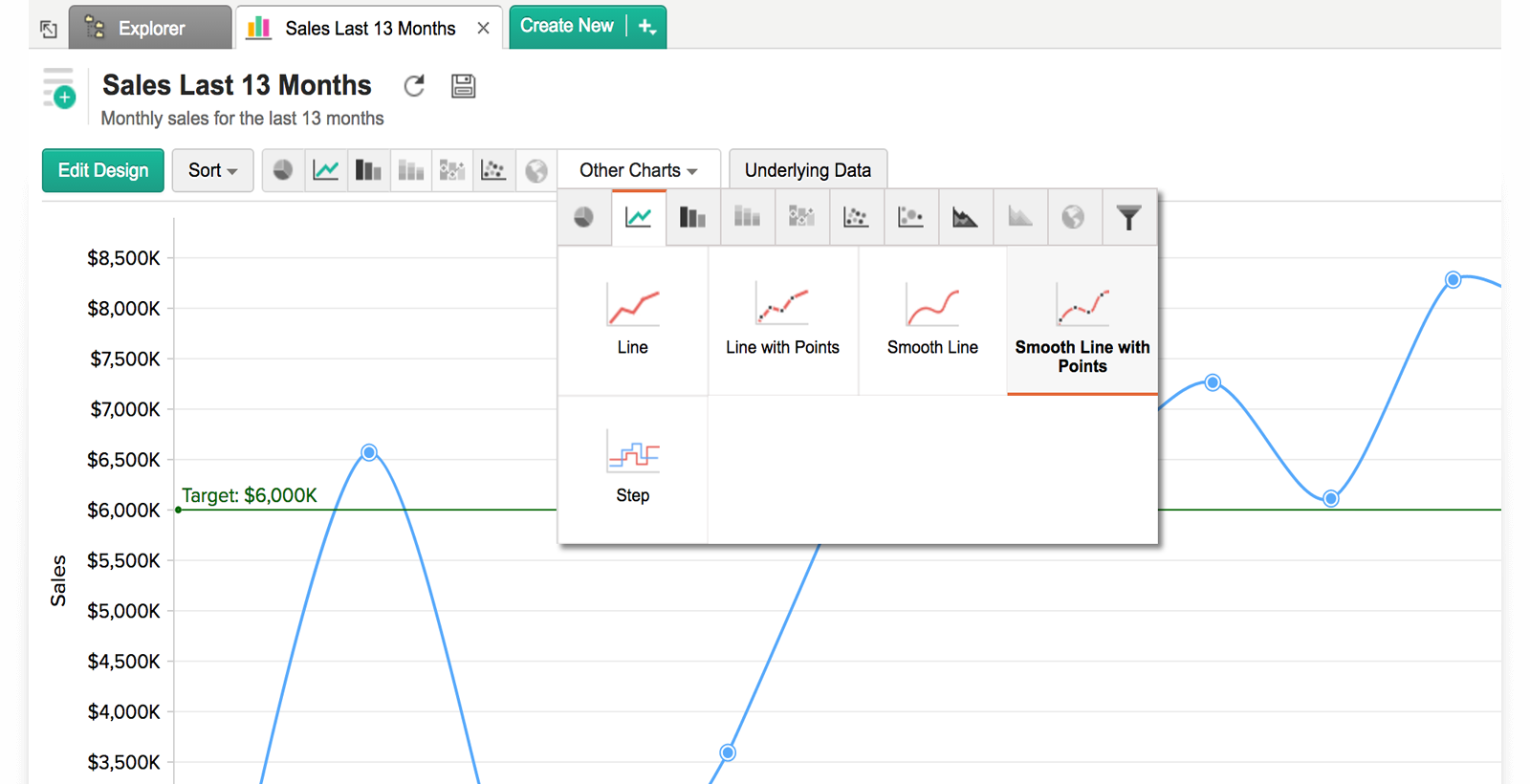
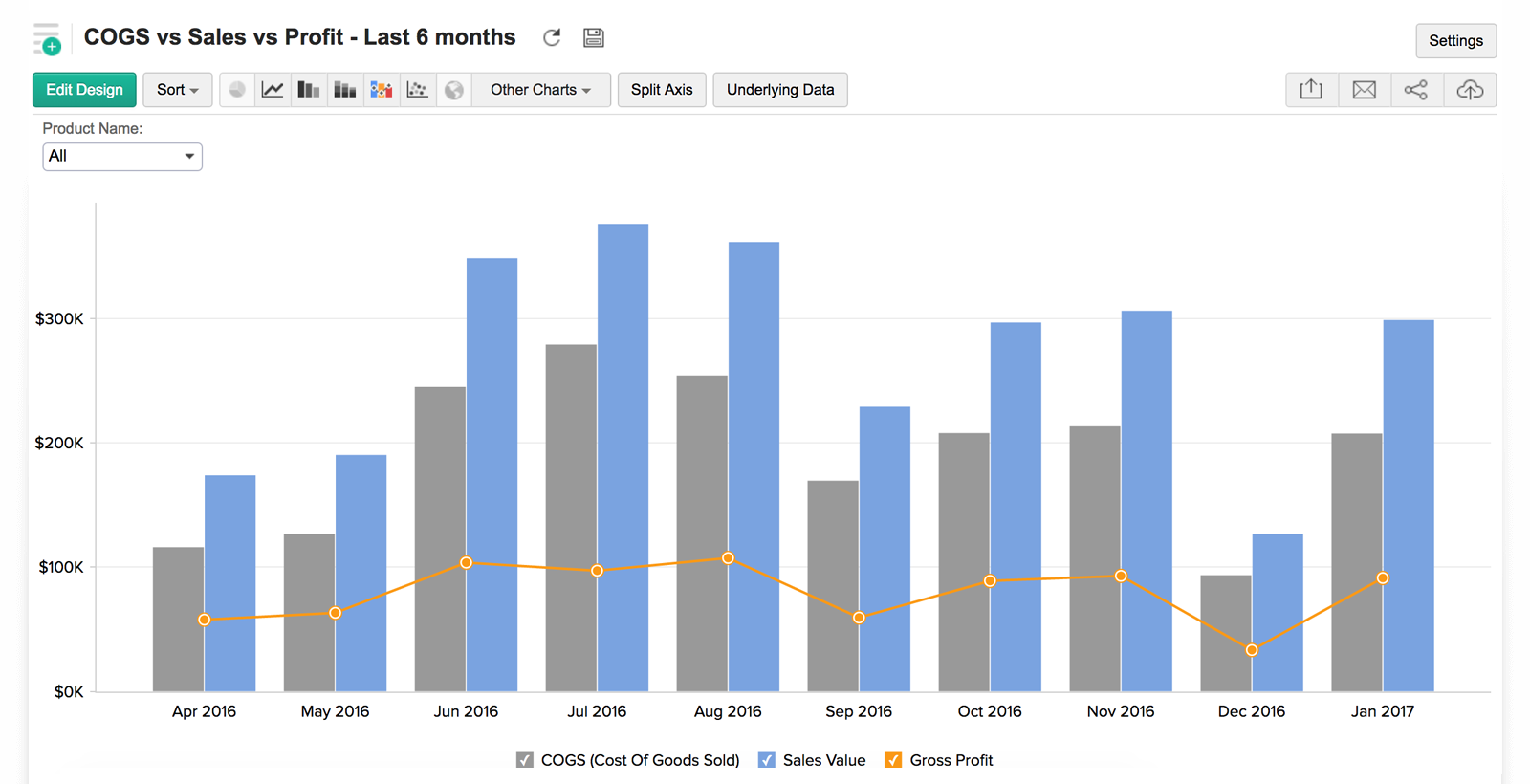
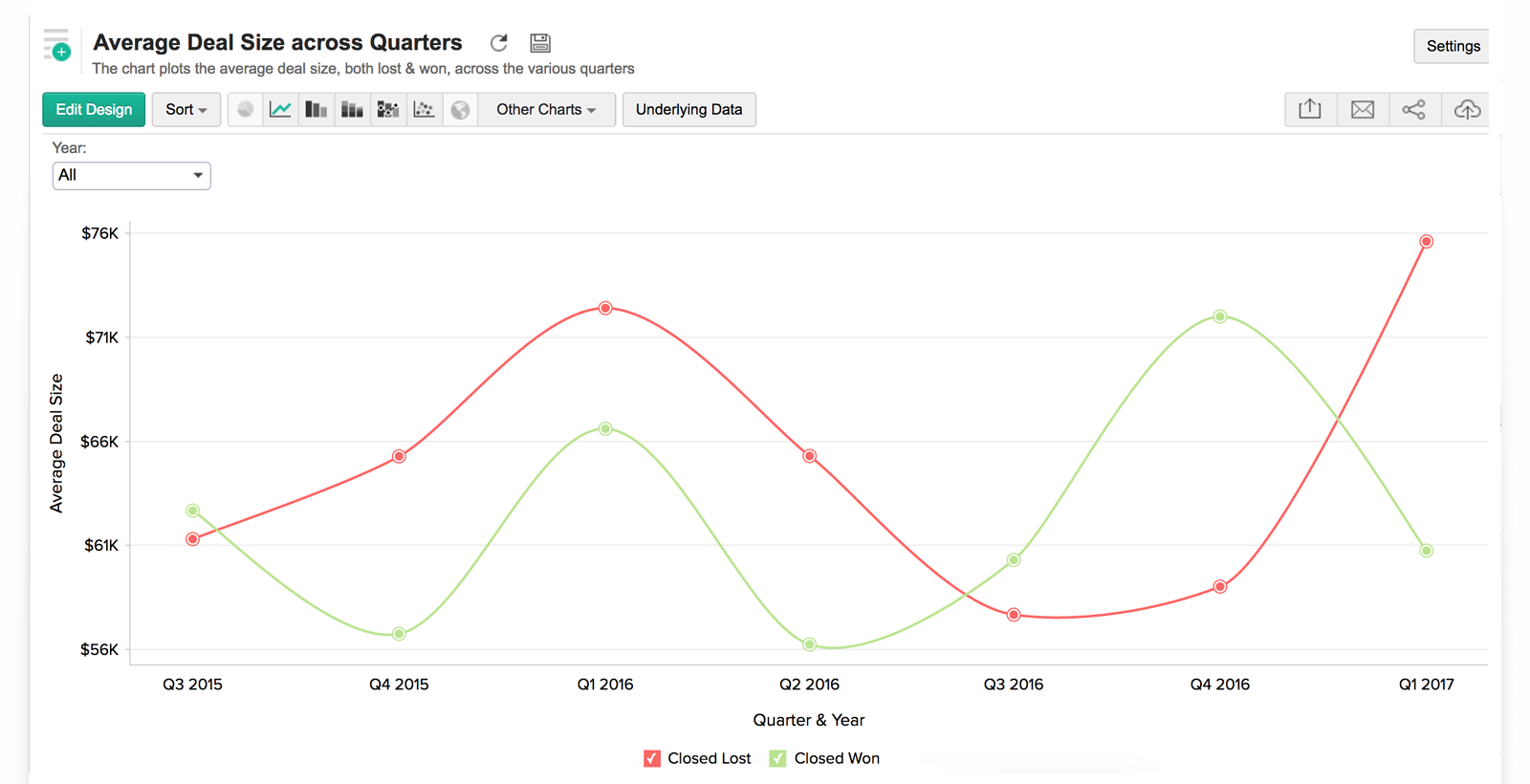
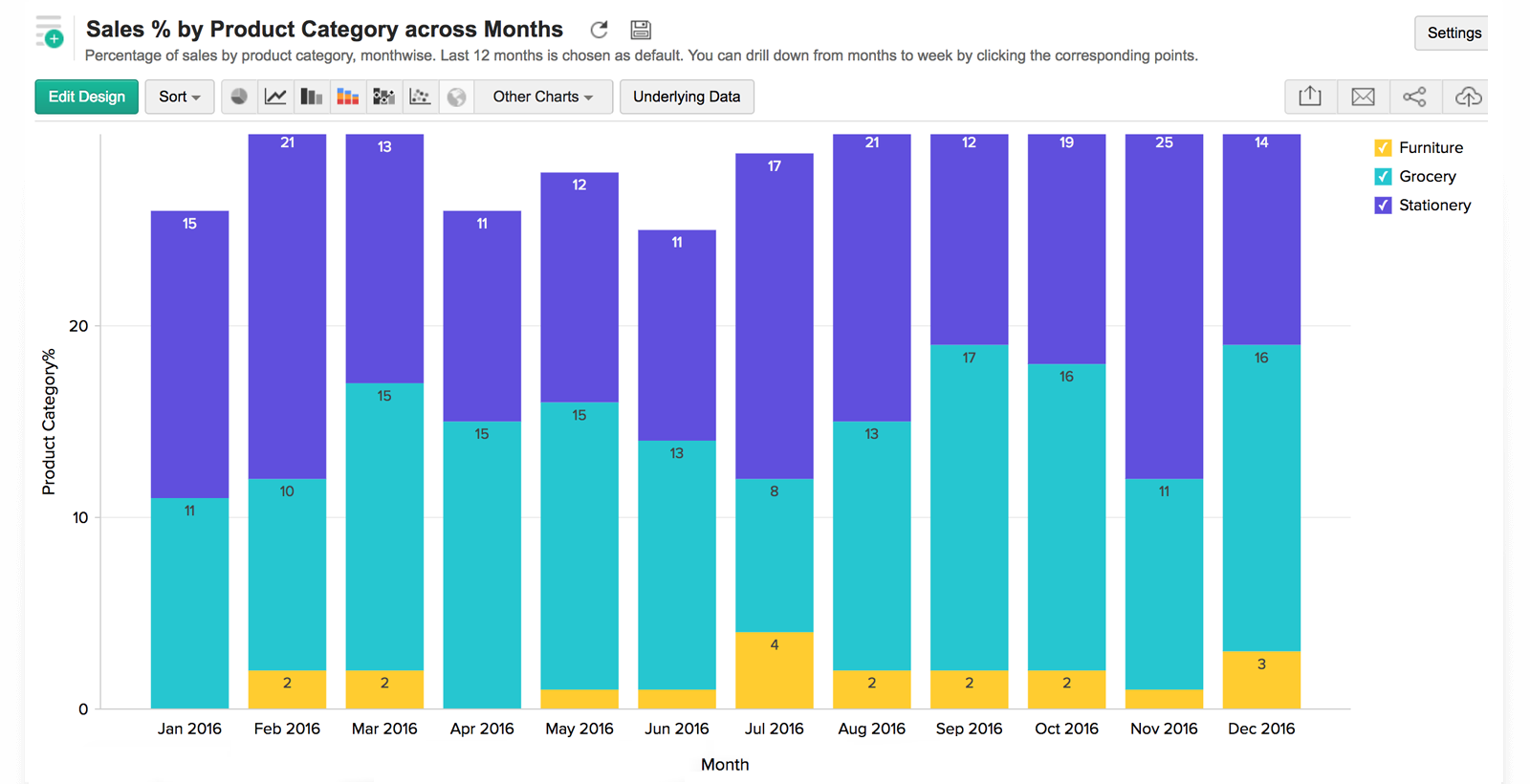
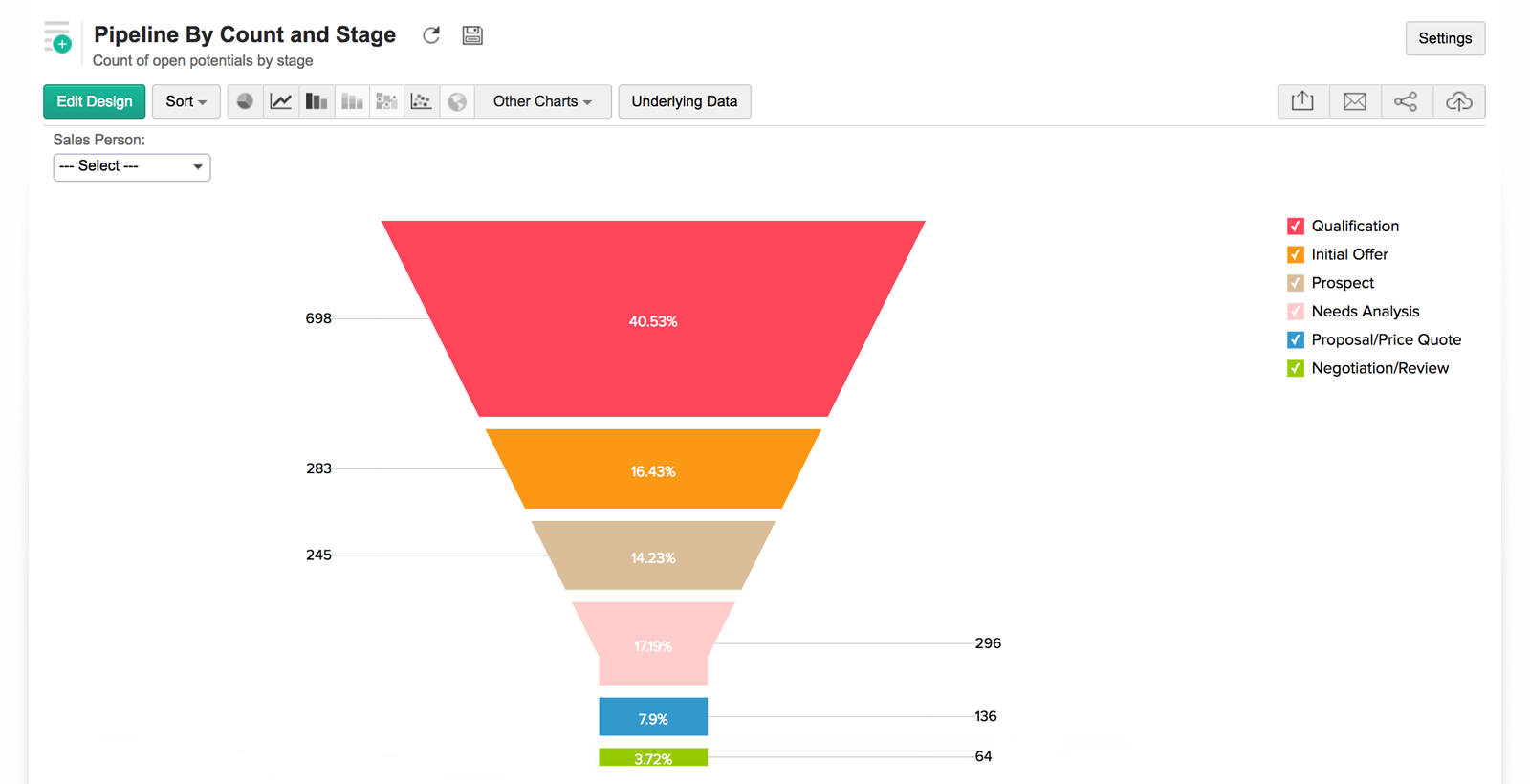
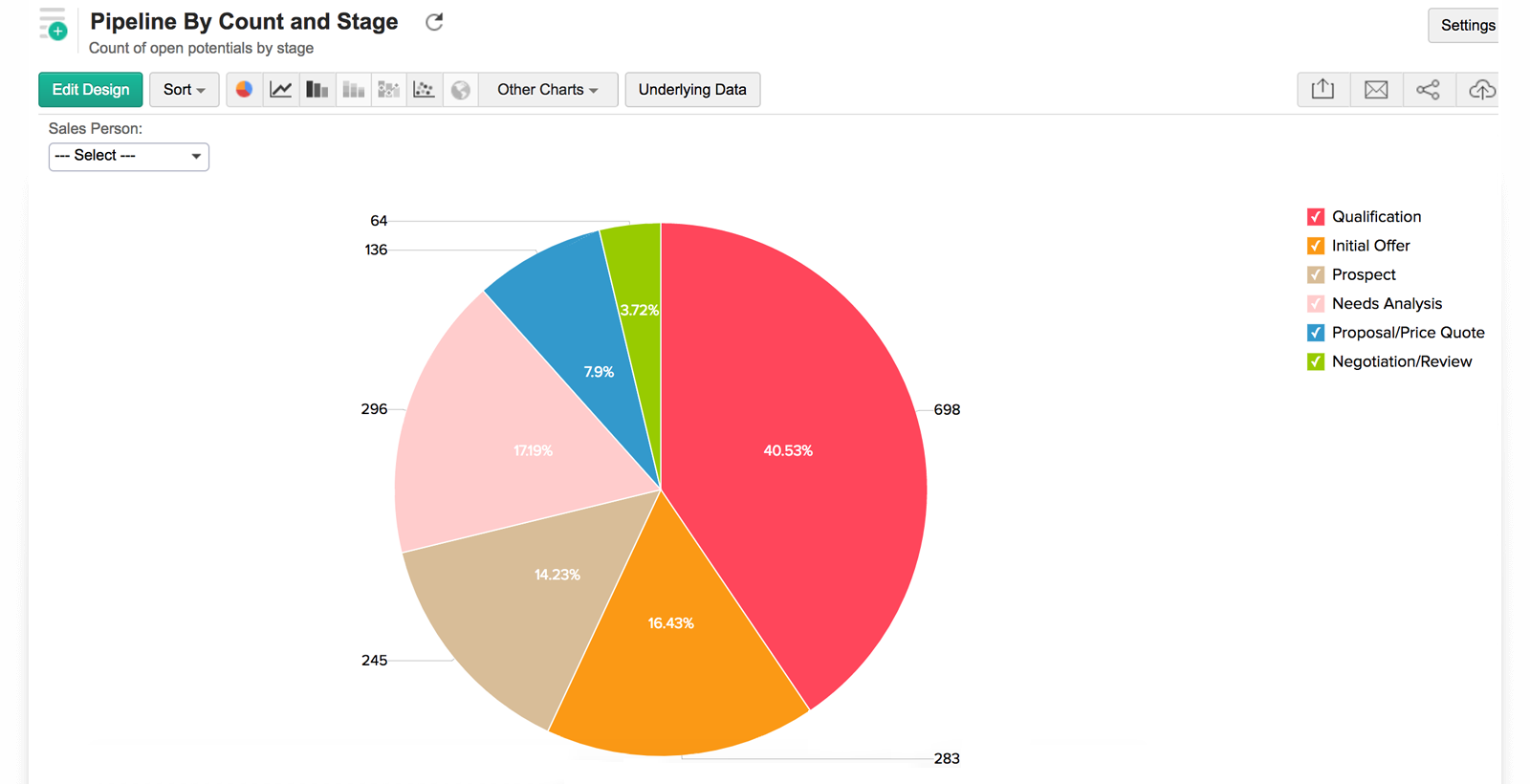
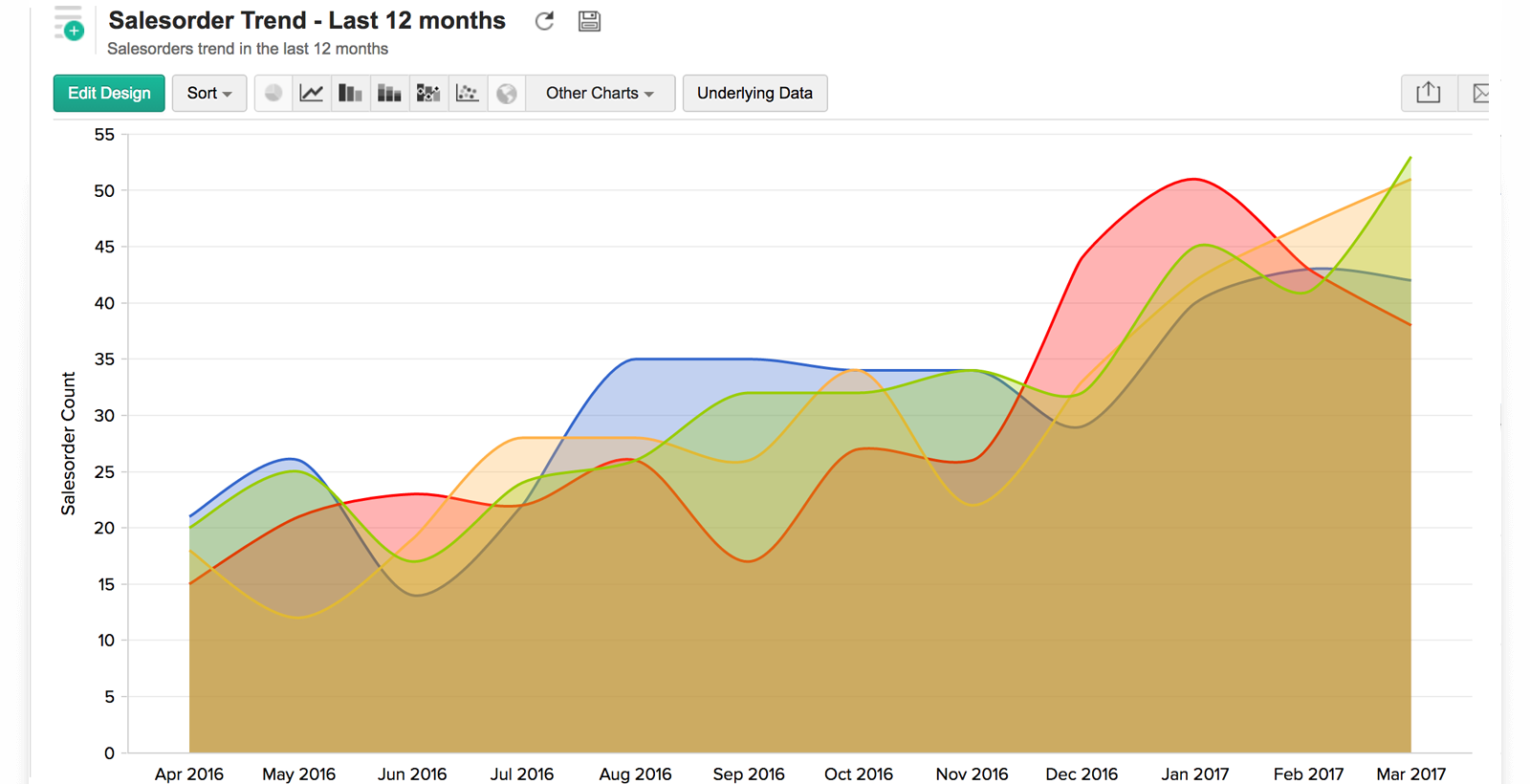
</style><!-- HTML5 element support for IE6-8 --><!--[if lt IE 9]><script src="//html5shiv.googlecode.com/svn/trunk/html5.js"></script><![endif]--></head><body data-lang-list="en,es-xl,pt-br,de,fr"  class="html not-front not-logged-in no-sidebars page-node page-node- page-node-14922 node-type-features og-context og-context-node og-context-node-7786 i18n-en"><noscript><iframe src="//www.googletagmanager.com/ns.html?id=GTM-KBNVHH" height="0" width="0" style="display:none;visibility:hidden"></iframe></noscript><div class="main-container-wrapper"><div class="main-container blog"><div class="col-lg-12 padding0i"><div id="header" class="column"><div class="region region-blog-top-bar"><section id="block-block-3" class="block block-block clearfix"><div class="header"><a class="logo" href="/"> ZOHO  </a><div class="signing"><a class="signup" href="#">Sign Up Now</a><a class="signin" href="#">LOGIN</a></div></div></section><section id="block-block-4" class="block block-block clearfix"><div class="product-header-top slide"> </div></section><section id="block-panels-mini-product-menu" class="block block-panels-mini clearfix"><div id="mini-panel-product_menu"><div class="content-wrap"><div class="menu-icon-help-header pull-left"><a href="/analytics/"><img typeof="foaf:Image" class="img-responsive" src="//iz.zohostatic.com/sites/default/files/styles/product-home-page/public/icon-analytics.png?itok=qr4BEfRy" alt=""></a><div class="product-title"><a href="/analytics/">Analytics</a></div></div><div class="product-nav-links"><span class="mobile-menu-icon"></span><ul class="menu nav"><li class="first leaf"><a href="/analytics/features.html" title="">Features</a></li><li class="collapsed"><a href="/analytics/zohoanalytics-pricing.html" title="">Pricing</a></li><li class="leaf"><a href="/analytics/import-export.html" title="" class="active">Tour</a></li><li class="leaf"><a href="/analytics/solutions.html" title="">Solutions</a></li><li class="leaf"><a href="/analytics/testimonials.html" title="">Customers</a></li><li class="last leaf"><a href="/analytics/help/" title="">Resources</a></li></ul></div></div></div></section></div></div><!-- header close --></div><div class="row nomargin"><section><div class="region region-content"><section id="block-system-main" class="block block-system clearfix"><div class="panel-display container-fluid padding0i"><div class="row"><div class="col-lg-12 col-md-12 col-sm-12 col-xs-12 padding0i backend-layout-top"><div class="panel-panel panel-region-preface"><div class="inside"><div class="panel-separator"></div><div class=" features-header-promo"><div class="faq-nav"><ul><li><a href="/analytics/import-export.html">Import</a></li><li class="active"><a href="/analytics/chart-data.html">Charting</a></li><li><a href="/analytics/pivot-table.html">Pivot Table</a></li><li><a href="/analytics/dashboard.html">Dashboards</a></li><li><a href="/analytics/collaboration.html">Collaboration</a></li><li><a href="/analytics/interesting-features.html">Other Interesting Features</a></li></ul></div></div><div class="panel-separator"></div><div class="views-table cols-0 table table-hover table-striped"><div class="features-item bottom-image  no-shadow"><div class="content-wrap"><div class="cont-part"><h2>Chart Creation</h2><p>To create a chart, click <strong>New -&gt; New Chart View</strong>, upon selecting the corresponding table or Query Table.<a class="youtube cboxElement analytics-video video-icon" data-video-url="https://www.youtube.com/embed/6IegPNlM8Bg?autoplay=1" href="/analytics/chart-data.html#">Watch demo</a></p></div><div class="image-part"><div><img class="img-responsive" src="//iz.zohostatic.com/sites/default/files/charting-screen-shot1_0.png"></div></div></div><div class="html-part content-wrap"></div><div class="promo-wrap"></div></div><div class="features-item bottom-image  "><div class="content-wrap"><div class="cont-part"><h2>Drag and Drop based Chart Creation</h2><p>Use the intuitive drag and drop based designer to construct the required chart. Drag the columns listed on the left pane and drop them in the appropriate shelves in the design area. <a href="/analytics/help/chart/create-new-chart.html" target="_blank">Learn More</a></p></div><div class="image-part"><div><img class="img-responsive" src="//iz.zohostatic.com/sites/default/files/drag-and-drop_0.gif"></div></div></div><div class="html-part content-wrap"></div><div class="promo-wrap"></div></div><div class="features-item bottom-image  no-shadow"><div class="content-wrap"><div class="cont-part"><h2>Multiple Y - Axis</h2><p>You can create charts with multiple Y - axis. Below is an example chart having Sales, Cost &amp; Profit in the Y-axis.</p></div><div class="image-part"><div><img class="img-responsive" src="//iz.zohostatic.com/sites/default/files/charting-screen-shot4_1.png"></div></div></div><div class="html-part content-wrap"></div><div class="promo-wrap"></div></div><div class="features-item bottom-image  no-shadow"><div class="content-wrap"><div class="cont-part"><h2>Applying Powerful Filters</h2><p>You can apply powerful filters over charts by selecting the <strong>Filters</strong> tab in the design area.<br>
These are design time filters applied when you create a chart.<br><br>
Below is a screenshot of the Sales-Cost-Profit data chart with the filter applied for the year 2015 alone. <a href="/analytics/help/chart/applying-filters.html#Filters" target="_blank">Click to know more</a>.</p></div><div class="image-part"><div><img class="img-responsive" src="//iz.zohostatic.com/sites/default/files/charting-screen-shot5_0.png"></div></div></div><div class="html-part content-wrap"></div><div class="promo-wrap"></div></div><div class="features-item bottom-image  "><div class="content-wrap"><div class="cont-part"><h2>Dynamic Filters for User Interaction</h2><p>Zoho Analytics allows you to include dynamic filtering capability in the analytics you create, known as User Filters.<br>
User filters enable your users who access the report, to apply filters on the data displayed. <a href="/analytics/help/chart/applying-filters.html#User_Filters_on_Category(String)_Type_Columns" target="_blank">Learn More </a></p></div><div class="image-part"><div><img class="img-responsive" src="//iz.zohostatic.com/sites/default/files/user-filters_0.gif"></div></div></div><div class="html-part content-wrap"></div><div class="promo-wrap"></div></div><div class="features-item bottom-image  no-shadow"><div class="content-wrap"><div class="cont-part"><h2>Drill Down</h2><p>With the drill down feature, you can start with a category in the chart to drill down the hierarchy. This helps you to perform exploratory analytics of the category, right away in the same window. <a href="/analytics/help/chart/customizing-a-chart.html#drill-down" target="_blank">Click to know more</a></p></div><div class="image-part"><div><img class="img-responsive" src="//iz.zohostatic.com/sites/default/files/drill-down_0.gif"></div></div></div><div class="html-part content-wrap"></div><div class="promo-wrap"></div></div><div class="features-item bottom-image  "><div class="content-wrap"><div class="cont-part"><h2>Chart Types</h2><p>You can choose to view your chart in any of the wide range of chart types offered by Zoho Analytics, depending on the data.</p><p>Zoho Analytics supports Line, Bar, Combination, Scatter, Stacked Bar, Pie, Funnel, Ring, Area, Stacked Area, Web and Table chart types.</p></div><div class="image-part"></div></div><div class="html-part content-wrap"><div class="img-wrap"><div data-delay="2500" class="z-slider-wrap enable-auto-slide enable-nav" id="xJg6v"><ul class="z-slider mTop-0"><li style="display: none;"><img class="mTop-0" src="https://www.zoho.com/analytics/images/chart-type01.png"></li><li style="display: none;"><img class="mTop-0" src="https://www.zoho.com/analytics/images/chart-type02.png"></li><li style="display: none;"><img class="mTop-0" src="https://www.zoho.com/analytics/images/chart-type03.png"></li><li style="display: none;"><img class="mTop-0" src="https://www.zoho.com/analytics/images/chart-type04.png"></li><li style="display: none;"><img class="mTop-0" src="https://www.zoho.com/analytics/images/chart-type05.png"></li><li style="display: none;"><img class="mTop-0" src="https://www.zoho.com/analytics/images/chart-type06.png"></li><li style="display: list-item;"><img class="mTop-0" src="https://www.zoho.com/analytics/images/chart-type07.png"></li></ul></div></div></div><div class="promo-wrap"></div></div><div class="features-item bottom-image  "><div class="content-wrap"><div class="cont-part"><h2></h2><h3>If you require more information or have questions on Zoho Analytics, you can</h3><ul class="mor-feat"><li>checkout <a href="/analytics/help/">Zoho Analytics help documentation</a></li><li>mail us to <a href="mailto:support@zohoanalytics.com">support@zohoanalytics.com</a></li><li>checkout <a href="http://forums.zohoanalytics.com/" target="_blank">Zoho Analytics user forums</a> for technical discussions on Zoho Analytics.</li></ul></div><div class="image-part"></div></div><div class="html-part content-wrap"></div><div class="promo-wrap"></div></div></div></div></div></div></div><div class="container padding0i"><div class="row"><div class="panel-panel panel-region-preface backend-layout-right full-width"><div class="inside"><div class="panel-pane pane-block pane-menu-analytics-7786 all-features pane-menu"><h2 class="pane-title">
      ALL FEATURES    </h2><div class="pane-content"><ul class="menu nav"><li class="first leaf"><a href="/analytics/ImportCSV/import-data.html" title="">From files and feeds</a></li><li class="leaf active-trail active"><a href="/analytics/chart-data.html" class="active-trail active">Charts</a></li><li class="leaf"><a href="https://www.zoho.com/analytics/isv.html" title="">For ISVs, OEMs and others</a></li><li class="leaf"><a href="/analytics/moving-database.html">From databases and apps</a></li><li class="leaf"><a href="/analytics/pivot-table.html">Pivot tables</a></li><li class="leaf"><a href="https://www.zoho.com/analytics/blog/7-reasons-to-implement-a-white-labeled-embedded-bi-solution.html" title="">Top reasons to choose an embedded BI solution</a></li><li class="leaf"><a href="/analytics/featured-connectors.html" title="">Using connectors</a></li><li class="leaf"><a href="/analytics/chart-picker.html">Chart picker guide</a></li><li class="leaf"><a href="https://www.zoho.com/analytics/blog/bi-white-label-types.html" title="">Types of white label BI solutions</a></li><li class="leaf"><a href="/content/analytics-help-0" title="">Share analytics</a></li><li class="leaf"><a href="/analytics/mobile-bi-old.html">Mobile BI</a></li><li class="leaf"><a href="/content/analytics-help-1" title="">Publishing</a></li><li class="leaf"><a href="https://www.zoho.com/analytics/big-data.html" title="">Big data analytics</a></li><li class="leaf"><a href="/content/analytics-help" title="">Embedding</a></li><li class="last leaf"><a href="https://zohoanalyticsapi.wiki.zoho.com/" title="">API</a></li></ul></div></div></div></div></div></div></div></section></div></section></div></div></div><!-- maincontainer end --><div class="footer-wrapper"><footer></footer></div><script src="//jz.zohostatic.com/sites/default/files/js/zcms.js?p2dlqn"></script><script src="//jz.zohostatic.com/sites/all/themes/zoho/scripts/zohocustom.js?p2dlqn"></script><script src="//jz.zohostatic.com/sites/default/files/cpn/features.js?p2dlqn"></script><script src="/sites/all/themes/zoho/scripts/analytics.js?p2dlqn"></script><script src="//jz.zohostatic.com/sites/default/files/cpn/14922.js?p2dlqn"></script></body></html>