Admin Console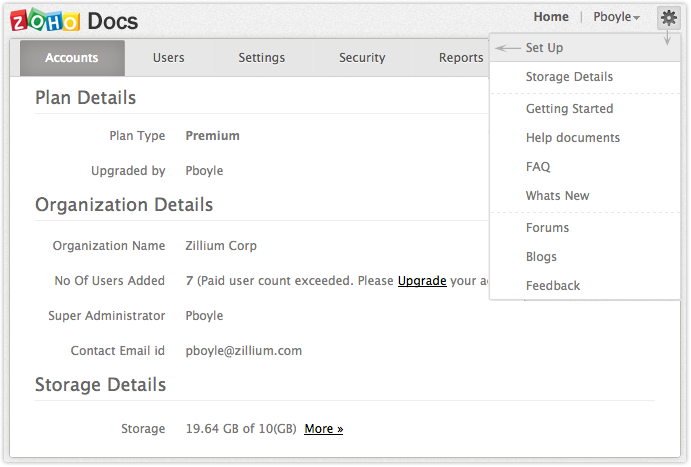 | ||
| Zoho Docs Online Document Management provides an Admin Console, It contains all the options to manage and customize your organization. It lets you to manage users, customize logos, manage domains, set permissions to users and much more. As an administrator you can set organization policies to restrict and permit specific rights to users in the organization from anywhere. Using Admin Console you can define IPs from where the organization members can access the files. As an Administrator you have total control and mobility over the files that are centrally located in Zoho Docs, and also you can streamline your organization domains, users, groups in a faster way. | ||
Dashboard | ||
| Dashboard in the Admin Console consists of general details like Number of Users present in the organization, Number of Organization Groups, Portal URL, Super Administrator and Contact Email-Id. You can view and edit users details, organization group details, super administrator, and also customize logo in the general page of Admin Console. | ||
Customize Logo
| ||
Domain Management | ||
| As an Administrator you can register for a new domain or configure the present domain, and access Zoho Docs using your own domain URL. | ||
Manage Domains
| ||
Register Domain
| ||
User Management | ||
| Add and import users to be a part of your organization. As an administrator you can control the access rights of the user, and also change the role and location of the user. | ||
Manage Users
| ||
Import Users
| ||
Delete User | ||
| Admin can delete any user if he/she has to leave the organization. Please keep in mind, deleting a user will completely delete all the user's data including the user name which cannot be retrieved anymore. Learn more.. Disassociate UsersAdmin can disassociate any user in an Organization. If the User is disassociated from the Organization, the User becomes a personal Zoho User and all data related to the Organization will be lost. Learn more.. | ||
Organizational Policies | ||
|
Zoho Docs  Online Document Management Software
Online Document Management Software 


